


Desk Wellness Pack
Designing a lightweight behaviour-support system for healthier desk habits
Role: Product Designer / UX Strategist / Builder
Platform: Chrome Extension, Manifest V3
Tools: VS Code · GitHub · Chrome Extension APIs · Stripe · Vercel · Google Cloud Console · Google Calendar API
GitHub: https://github.com/JoIonescu/desk-wellness-pack
Landing page and Privacy Policy: https://deskwellnwsspack.netlify.app/
Overview
What started as a Chrome extension to prompt desk-based users to take stretch breaks became something more interesting: a two-module wellness system, designed to stay out of your way.
The product now ships as Desk Wellness Pack, two independent background timers that together address the two easiest things for desk workers to forget: moving their body and drinking water.
WHAT IT SHIPS WITH
-
Smart Stretch. Adaptive stretch reminders with session variation, weekly stats, and optional Google Calendar integration
-
Water Reminder. Hydration tracking with animated glass, daily glass count, and independent background timer
-
Tabbed popup with module-level Pro badges and separate upgrade paths
-
Shared toolbar badge logic. Colour-coded countdown, 💧 drop when water is active, MTG during meetings
-
Stateless HMAC-SHA256 licensing, no database, no user accounts, no subscriptions
-
Serverless backend on Vercel. Stripe checkout, payment verification, license issuance
The problem
During long work sessions, it is easy to stay focused until physical discomfort becomes the first signal that a break was overdue.
The issue was not awareness. Most people already know they should move more, and drink more water.
The issue was behavioural:
Healthy habits are easy to postpone when work is flowing.
That created a focused design challenge:
How might I build a low-friction reminder system that helps users build healthier desk habits without becoming annoying, visually noisy, or easy to dismiss?
The product goal
This project was never really about building timers.
It was about building a micro-behaviour system that feels calm, clear, and trustworthy. That principle shaped every architectural and UX decision:
-
Both timers should keep working even when the popup is closed
-
The UI should always reflect real state, never appear inactive when active
-
Snooze is temporary. Skip returns the user to their preferred rhythm
-
The break should feel like a guided moment, not a generic interruption
-
Water reminders should be independent, the two modules should not interfere
For a tool this small, those details are not polish. They are the product.
Architecture: separating system state from UI state
One of the most important decisions was architectural. The extension has four temporary surfaces — Welcome, Popup, Stretch screen, Water screen — and one persistent engine: background.js.
Key principle
The background owns both reminder cycles. The popup only reflects them.
This separation prevented the most common failure mode in browser extensions: a UI that appears to have stopped when the timer is actually still running. It also enabled something important — water and stretch could be designed as genuinely independent modules sharing one background engine, without coupling their state.
Storage architecture
All stats, settings, and timer state live in chrome.storage.local. Only two things live in chrome.storage.sync: the installation ID and license tokens. This means user data is private to their device, while Pro status follows them across Chrome profiles.
// Local — device only
chrome.storage.local → timer state, stats, glass count, settings, meeting state
// Sync — follows the user across Chrome profiles
chrome.storage.sync → installationId
licenseToken (stretch)
waterLicenseToken (water)
Alarm scheduling
Both modules use chrome.alarms (MV3's minimum 1-minute granularity) for background scheduling. Neither depends on the service worker staying alive. When the service worker wakes, it reads saved state from storage and recovers.
// Stretch — repeating alarm
chrome.alarms.create('stretchAlarm', {
delayInMinutes: selectedMinutes,
periodInMinutes: selectedMinutes
});
// Water — one-shot, rescheduled after each interaction
chrome.alarms.create('waterAlarm', {
delayInMinutes: selectedMinutes
});
Water uses one-shot alarms deliberately. After the user logs a glass or skips, the next alarm is scheduled fresh from that moment, preserving a natural hydration rhythm rather than a mechanical one.
File structure
The project is split into extension code and a serverless backend. Every surface has its own HTML + JS pair. background.js is the only persistent file.
A critical UX issue: the popup could lie
One of the earliest problems was subtle but serious. The timer was running in the background, but reopening the popup could show it as inactive or out of sync. That immediately damages trust:
-
Did it stop?
-
Did it reset?
-
Can I rely on this?
The fix was to restore the true runtime state whenever the popup opens — reading from storage, not from any in-memory variable that may have been lost when the service worker slept.
// popup.js — loadSettings() called on every open
const res = await sendMessage({ type: 'getSettings' });
// background.js — always reads from storage
const settings = await getLocal([
'interval', 'startTime', 'smartModeEnabled'
]);
const runtime = await getRuntimeState();
sendResponse({
stretchInterval: settings.interval,
startTime: settings.startTime,
stretchReminderState: runtime.stretchReminderState,
...
});
The same pattern applies to the water module. Every time the popup opens, it sends a getWaterSettings message and rebuilds the entire water timer display from fresh storage reads. The popup never owns state, it only reflects it.
For habit tools, visible truth matters more than visual activity.
A behaviour bug that mattered: Snooze → Skip
One of the most important logic issues surfaced in a real user flow.
The broken flow
-
User sets a 30-minute stretch interval and starts the timer
-
Reminder fires on schedule
-
User clicks Snooze, gets 5 more minutes
-
Reminder returns after 5 minutes
-
User clicks Skip
-
The extension starts another 5-minute cycle instead of returning to the original 30-minute rhythm
Why this mattered
This broke the user's mental model. Snooze means 'delay this one temporarily.' Skip means 'dismiss this and return to normal.' If Skip behaves like a second snooze, the product feels irrational — and users stop trusting it.
The fix
The fix was to separate two concepts that had been conflated:
-
userInterval
-
activeInterval
// userInterval — what the user chose
// interval — what is currently active (may be a 5-min snooze)
async function resumeMainTimerFromUserInterval() {
const { userInterval } = await getLocal(['userInterval']);
chrome.alarms.create(ALARM_NAME, {
delayInMinutes: userInterval,
periodInMinutes: userInterval
});
await setLocal({ interval: userInterval, startTime: Date.now() });
}
Skip and stretch completion both call resumeMainTimerFromUserInterval(). Snooze schedules a temporary 5-minute alarm. The user's chosen cadence is never disturbed by a temporary override.
Smart Stretch: reducing repetition without "pretending to be AI"
Every reminder used to feel the same. The session logic was evolving internally, but the visible stretch experience defaulted to the same exercise, creating a mismatch the user could feel.
The product is intentionally small. The real design work was making it reliable, predictable, and behaviourally sound, across two modules, two payment flows, and one shared background engine.
EXTENSION: ROOT FOLDER

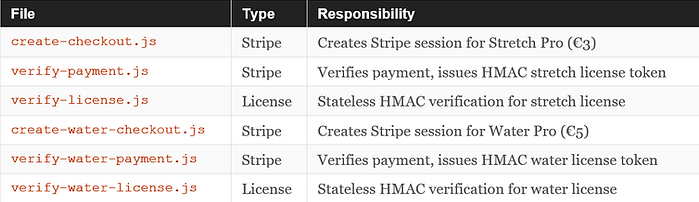
BACKEND: /API FOLDER
The system was becoming smarter. The user was still seeing the same break.
What Smart Stretch actually is
This extension does not use AI or machine learning. It uses a lightweight decision layer that reads the last 8 interactions and maps them to one of four session types:
async function chooseSmartSessionType() {
const recent = history.slice(-8);
const recentSkipped = recent.filter(e => e.type === 'skipped').length;
const recentSnoozed = recent.filter(e => e.type === 'snoozed').length;
const recentCompleted = recent.filter(e => e.type === 'completed').length;
if (recentSkipped + recentSnoozed >= 4) return 'quick_reset';
if (recentSkipped + recentSnoozed >= 2) return 'gentle_stretch';
if (recentCompleted >= 5 && recentSkipped === 0) return 'full_reset';
return 'standard_stretch';
}
The four session types — quick_reset (30s), gentle_stretch (45s), standard_stretch (60s), full_reset (90s) — each carry their own title, exercise name, and guidance copy. The session chosen by the background is stored to local storage. When the stretch screen opens, it reads and applies it.
This was the moment the product stopped feeling like it was replaying the same interruption. It felt more intentional — more honest about what the user's recent behaviour had been.
Adding Water Reminder: designing a second module without doubling the complexity
After shipping Smart Stretch, the most natural next step was hydration. Dehydration and lack of movement often go together at a desk — and they share the same root cause: work has your full attention, and your body doesn't.
The design challenge was not 'what should the water screen look like.' It was:
How do you add a second independent module to an extension that already has a functioning system, without introducing coupling, complexity, or visual noise?
The architectural decision: genuinely independent timers
The temptation was to add water as a sub-feature of stretch. I chose instead to treat it as a separate module: its own alarm, its own state keys, its own license, its own badge logic, its own UI section in the popup.
const WATER_ALARM_NAME = 'waterAlarm';
const WATER_MEETING_CHECK_ALARM = 'waterMeetingCheckAlarm';
const WATER_POST_MEETING_ALARM = 'waterPostMeetingAlarm';
const WATER_POST_MEETING_BUFFER_MINUTES = 5;
Both modules share background.js and the checkCalendar() function, but their state, alarms, and license tokens are entirely separate. A user can stop stretch without affecting water. They can buy Water Pro without touching Stretch Pro. The modules are independent by design.
One-shot vs repeating alarms
A key design decision for water: unlike stretch, which uses a repeating alarm, water uses a one-shot alarm rescheduled after each interaction. When the user logs a glass or skips, the next reminder is scheduled fresh from that moment. This means the rhythm adapts naturally to when the user actually drinks, not to an abstract clock.
// After logging a glass — next reminder from now
if (request.type === 'logGlass') {
const newCount = Number(data.waterGlassesToday || 0) + 1;
await setLocal({ waterGlassesToday: newCount });
scheduleWaterAlarm(ws.waterInterval); // fresh from now
sendResponse({ ok: true, waterGlassesToday: newCount });
}
The animated glass: making progress visible
The water screen was designed around a single emotional idea: the satisfaction of watching something fill up. The animated glass with a CSS wave surface, rising bubbles, and smooth fill transition gives users a moment of visible progress with every glass logged. It is small, but it makes the act of drinking water feel rewarding rather than administrative.
/* water.html — glass fill animates to match glasses / goal */
.water-fill {
transition: height 0.6s cubic-bezier(0.34, 1.56, 0.64, 1);
background: linear-gradient(180deg,
rgba(90,169,255,0.55),
rgba(61,143,224,0.75));
}
function renderGlass() {
const pct = Math.min(glasses / goal, 1);
waterFill.style.height = Math.max(pct * 96, 3) + '%';
}
The next reminder countdown
A subtle but important detail: the water screen shows a live countdown to the next reminder. This required aligning the water screen's own countdown with the popup's timer display. Both read from the same waterStartTime value stored when the alarm is scheduled, so they always agree.
// water.js — startReminderCountdown()
const render = () => {
const totalMs = intervalMinutes * 60 * 1000;
const elapsed = Date.now() - startTime;
const remaining = totalMs - elapsed;
nextReminderTime.textContent = formatRemaining(remaining);
};
render();
timerInterval = setInterval(render, 1000);
Meeting detection: one calendar integration, two modules
Pro users for either module can enable Skip during meetings. Both modules reuse the same checkCalendar() function, a single Google Calendar FreeBusy API call that returns only a busy/free status for the next 90 minutes.
A non-obvious MV3 constraint: where OAuth can run
Chrome's Manifest V3 has a strict rule: chrome.identity.getAuthToken({ interactive: true }) silently fails when called from a service worker or from the extension popup (which closes on focus loss). The only place interactive OAuth works reliably is a dedicated popup window.
// popup.js — open a dedicated window for auth
chrome.windows.create({
url: chrome.runtime.getURL('oauth.html'),
type: 'popup',
width: 380,
height: 260,
focused: true
});
// oauth.js — gets the token, sends result back
chrome.identity.getAuthToken({ interactive: true }, (token) => {
chrome.runtime.sendMessage({
type: 'calendarAuthResult',
success: !!token
});
});
This architecture applies to both modules, the same OAuth window is reused for both stretch and water calendar integration. One shared token, two separate calendarEnabled flags.
Water meeting state machine
When a water alarm fires and a meeting is detected, the module enters a three-state flow identical in structure to stretch:
-
ALARM fires → check calendar → meeting detected → store waterMeetingActive, schedule waterMeetingCheckAlarm
-
MEETING_CHECK fires → meeting ended → store waterPostMeetingStartTime, schedule waterPostMeetingAlarm, badge switches from MTG to 💧
-
POST_MEETING fires → open water window, reschedule normal alarm
// Meeting ended — switch badge from MTG to 💧
await setLocal({
waterMeetingActive: false,
waterMeetingEndTime: null,
waterPostMeetingStartTime: Date.now()
});
chrome.alarms.create(WATER_POST_MEETING_ALARM, {
delayInMinutes: WATER_POST_MEETING_BUFFER_MINUTES
});
startBadgeCountdown(); // badge loop now shows 💧, not MTG
The popup reflects this state with a live message: 'Meeting ended, water break starting in' with a 5-minute countdown. When the buffer expires, the water window opens with a fresh waterStartTime, and the normal alarm is rescheduled.
Badge logic: one icon, multiple meanings
The toolbar badge is the only persistent visual signal users see between reminders. Getting its state machine right was important, with two modules active simultaneously, it needed clear priority rules.
// Priority order inside startBadgeCountdown()
// 1. Stretch shown → clear badge
if (runtime.stretchReminderState === 'shown') { clearBadge(); return; }
// 2. Stretch in meeting → MTG (blue)
if (runtime.stretchReminderState === 'in_meeting') { setBadgeMeeting(); return; }
// 3. Stretch post-meeting → red countdown
if (runtime.stretchReminderState === 'post_meeting') { ... return; }
// 4. Stretch running → green/yellow/red countdown
if (data.interval && data.startTime) { /* colour-coded minutes */ return; }
// 5. No stretch — check water
if (waterData.waterMeetingActive) { setBadgeMeeting(); return; }
if (waterData.waterEnabled && waterData.waterStartTime) {
chrome.action.setBadgeBackgroundColor({ color: '#5aa9ff' });
chrome.action.setBadgeText({ text: '💧' });
return;
}
clearBadge();
A subtle fix worth noting: when stretch stops, stopTimer() checks whether water is still running before killing the badge countdown. If water is active, it calls startBadgeCountdown() instead of stopBadgeCountdown(), so the 💧 reappears immediately rather than requiring a full popup refresh.
Pro licensing: stateless, secure, no database
Both Pro tiers, Stretch (€3) and Water (€5), use the same stateless HMAC-SHA256 architecture. The backend issues a license token by hashing a module prefix with the installation ID. Verification is a comparison of hashes. No user records, no database, no subscriptions.
// verify-water-payment.js — issue water license token
const waterLicenseToken = crypto
.createHmac('sha256', process.env.LICENSE_SECRET)
.update('water:' + installationId)
.digest('hex');
// The 'water:' prefix ensures the token is
// cryptographically distinct from the stretch token,
// even though both use the same LICENSE_SECRET.
The prefix matters. Without it, a user who bought Stretch Pro could reuse the same token to unlock Water Pro. The HMAC prefix makes the two tokens mathematically independent.
License verification is cached in memory for 1 hour and trusted from storage for 24 hours. After 24 hours, the background silently re-verifies against the server. If the network is unavailable, the extension fails open, a user with a valid cached token is never locked out.
if (json.valid) {
_waterLicenseCache = { isPro: true };
} else {
_waterLicenseCache = { isPro: false };
}
} catch (e) {
// Network error — fail open. Offline users stay unlocked.
console.warn('License verify error, trusting cached:', e.message);
_waterLicenseCache = { isPro: true };
}
Manifest V3: platform constraints as product decisions
Several non-obvious MV3 constraints shaped the product architecture directly. Each one was discovered through testing, not documentation.
1. Inline onclick blocked by CSP
Chrome's Content Security Policy for extensions blocks inline event handlers. The tab switcher between Stretch and Water initially used onclick="switchTab('water')" directly in HTML, and silently failed. The fix was to wire all event handlers in JavaScript using addEventListener.
2. Service worker audio
Audio playback from a service worker is unreliable in MV3. Sound plays inside stretch.js and water.js, never from background.js. The service worker's alarm handler opens the screen, which then handles its own audio.
3. fetch() without timeout stalls service workers
An uncompleted fetch() inside an alarm handler can prevent the service worker from sleeping, causing memory and CPU issues. Every backend call uses a 5-second fetchWithTimeout() wrapper with an AbortController.
function fetchWithTimeout(url, options = {}, timeoutMs = 5000) {
const controller = new AbortController();
const timeoutId = setTimeout(
() => controller.abort(), timeoutMs
);
return fetch(url, { ...options, signal: controller.signal })
.finally(() => clearTimeout(timeoutId));
}
What makes this product strong
The extension is intentionally simple on the surface. Under that simplicity, it demonstrates product thinking in the areas that matter most:
1. Reliability over novelty
The most important feature is trust. If the timer, badge, and popup disagree with each other, the habit breaks — and users stop relying on the tool. Every architectural decision was made to prevent that disagreement.
2. Clear ownership of state
The background owns both reminder cycles. Temporary surfaces only reflect them. This is a constraint that makes the product more honest and easier to reason about.
3. Behaviourally correct controls
Snooze is temporary. Skip returns users to their preferred rhythm. Log a glass and the next reminder starts fresh. These are small decisions that make the product feel rational.
4. Independent modules, shared engine
Stretch and water are genuinely independent, separate alarms, state, licenses, and UI. They happen to share a background engine and a popup. That structure made it possible to add water without refactoring stretch.
5. Honest intelligence
'Smart Stretch' uses a lightweight decision layer, not AI. The session type is determined by a simple rule tree applied to the last 8 interactions. It is transparent, lightweight, and does exactly what it says.
6. Platform-aware implementation
OAuth in a dedicated window. Event listeners instead of inline handlers. One-shot alarms for water. fetch() with a hard timeout. These are not engineering niceties — they are product decisions made visible by real failures during testing.
Current feature set
SMART STRETCH
-
Persistent background alarm, works whether popup is open or closed
-
Live badge countdown, green, yellow, red by minutes remaining
-
Four adaptive session types driven by recent behaviour
-
Snooze (5 min) and Skip (returns to preferred interval)
-
Guided stretch screen with progress ring, session-aware instructions, completion state
-
Weekly stats, this week and last week side by side
-
Sound toggle for a gentle chime on screen open
-
Pro: Google Calendar meeting detection, 5-minute post-meeting buffer
WATER REMINDER
-
Independent background timer — separate from stretch in every way
-
Animated glass that fills as glasses are logged
-
Daily glass counter with dot progress tracker and live next-reminder countdown
-
One-shot alarm rescheduled from the moment of each interaction
-
Sound toggle with dedicated water chime
-
Badge shows 💧 when water is active, MTG when meeting is in progress
-
Pro: custom daily glass goal, Google Calendar meeting detection
SHARED INFRASTRUCTURE
-
Stateless HMAC-SHA256 licensing, two independent tokens, one shared secret
-
Serverless Vercel backend, Stripe checkout and license issuance
-
Shared Google Calendar FreeBusy integration, one OAuth token, two modules
-
CSP-compliant popup, event listeners only, no inline handlers
-
Service worker recovery, both modules restore from storage on every wake
What I learned
This project reinforced a principle that matters across every scale of product:
Small products still need systems thinking.
Even a lightweight extension can fail if the state model is unclear, the mental model is inconsistent, or the UI does not reflect reality. The most valuable work here was not visual polish.
It was aligning user expectations, background logic, surface behaviour, and product trust, across two modules, two payment flows, and one shared engine. That is what turned a timer experiment into a product case worth writing about.
What's next
The product ships as two modules. The architecture supports more. Potential additions that stay true to the product's philosophy:
-
Posture prompts. a third independent reminder module
-
Time-of-day stretch suggestions based on hourly patterns
-
Expanded exercise rotation with sessionStorage to prevent repetition
-
Accessibility modes. reduced motion, visual-only reminders
-
User-configurable Smart Stretch thresholds
The goal is not feature growth. It is sustainable, low-friction behaviour support that earns a permanent place in someone's workday.
Final reflection
This project started with a personal frustration: working until discomfort was the first signal I had ignored my body too long.
What it became is a compact but thoughtful dual-module product. Not just a Chrome extension.
A small system designed to help people work more sustainably, without demanding more attention from them than necessary.
